
ICON Tech
ICON Intelligent Control App Support
Tune your shocks from your phone. Download the app, pair it to your IIC control unit, get it calibrated, and sort out anything that isn't behaving — it's all on this page.
Download on the App Store Free · iPhoneAn Android version is in development. The app is iOS-only for now.
What is ICON Intelligent Control?
IIC is an electronically adjustable damping system. A control unit mounted in the vehicle reads what the truck is doing and changes the shock settings on the fly — in about 40 milliseconds.
- It reacts on its own. Internal sensors monitor cornering, G-events, acceleration and brake dive, and adjust damping to suit.
- You stay in control. Set the baseline damping and Boost sensitivity yourself from the Drive Mode screen.
- It's not the same as CDCV. A CDCV shock is adjusted by hand at the shock. IIC uses a variable electronic solenoid that you adjust from inside the vehicle, and that the control unit can actively manage while you drive.
- It keeps working without your phone. With no phone connected, the system holds its last known setting.


Quick start
Six steps from box to Drive Mode. For torque values, routing and vehicle-specific detail, follow the printed instructions that came with your kit.
-
Mount the control unit
Orientation is critical. Mount the unit flat and level, with the plugs facing the passenger side and the arrow pointing forward. Pick a spot with decent airflow, away from high heat.
Calibration compensates for some tilt, as long as the arrow points forward.
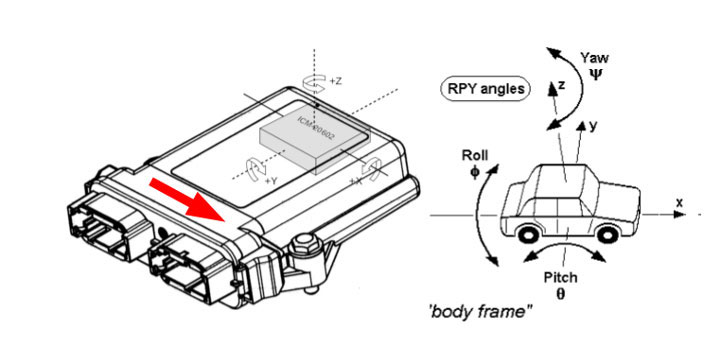
Control unit orientation. Arrow forward, plugs to the passenger side, close to level. -
Wire the shocks to the control unit
If you're installing as recommended, every harness you need came in the kit. Longer extension harnesses are available from this site or any authorized ICON dealer.
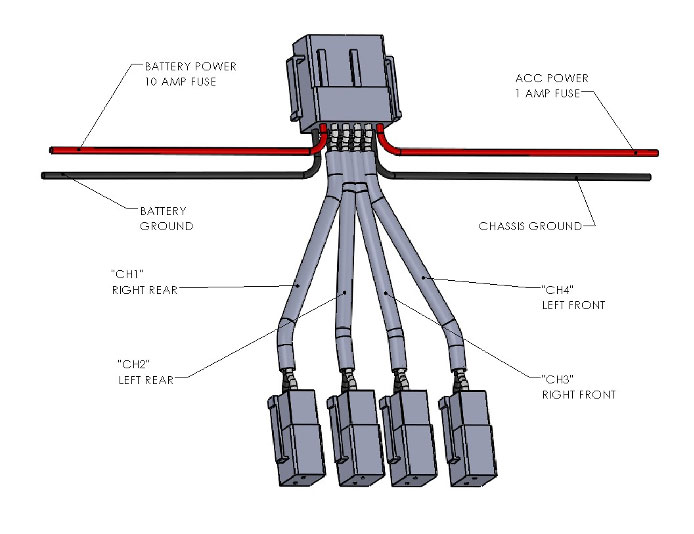
Channel output diagram — which channel feeds which corner. -
Get the app
Download ICON Intelligent Control free from the App Store. Requires iOS 13.0 or later.
-
Pair over Bluetooth
With the vehicle on, open the Main Menu and go to Vehicle Management. Tap the three dots on the right, then Reconnect. Select your control box when Bluetooth finds it, confirm the shocks are active, and tap Finish.
A green checkmark at each corner means that shock was found. Use this same screen to switch between multiple IIC-equipped vehicles.
-
Calibrate the system
Don't skip this. Tell the system how far left or right of center, and how far forward or rearward of the front axle, the control unit is mounted.
Mounted correctly but never calibrated, the system will physically work — but its G-force and cornering sensitivity won't be accurate.
-
Dial in Drive Mode and Boost
Boost controls both how sensitive the adaptive system is and how much compression damping it adds. Ride quality is subjective, so adjust to taste.
Avoid running high shock settings and high Boost settings together — that combination works against the adaptive capability of the system.
Full install instructions for your specific vehicle are in the instruction manuals & downloads library.
App FAQ
Does ICON offer an app for Android?
Not yet, but soon. The ICON IIC app is currently available for iOS devices only. We are in the process of developing an Android-compatible version.
Where can I buy the IIC kit?
ICON Intelligent Control install kits are available right here on the ICON Vehicle Dynamics website, or from any authorized ICON dealer.
How does this system differ from CDCV shocks?
The IIC uses a variable electronic solenoid that can not only be adjusted from within the vehicle, but also has a control unit that can be set to actively control suspension damping based on the input it receives from its internal sensors. Those sensors monitor cornering and G-events as well as acceleration and brake dive, constantly changing damper settings — in 40 milliseconds — to improve ride quality and handling.
What if I have multiple vehicles equipped with IIC?
If you have access to multiple vehicles equipped with IIC, you can switch between them in the Vehicle Management screen on the Main Menu. With the vehicle on, tap the three dots on the right, then tap Reconnect. Select the control box unit when Bluetooth finds it, confirm that the shocks are active, and tap Finish.
What is the best way to set up the Boost settings?
The Boost settings adjust both the sensitivity of the adaptive system and the amount of compression damping that is applied. Ride quality is a subjective feeling, so adjust the Boost levels to suit you.
Avoid high shock settings and high Boost settings together — that combination won't take full advantage of the adaptive capability of the system.
Where do I mount the control unit if the suggested location isn't available?
If you're unable to mount the IIC unit in the designated area, choose a spot with relatively good airflow, away from high heat.
The orientation of the board is critical. Mount the control unit flat and level, with the plugs facing the passenger side. The arrow must point forward, and the box must be close to level in the other directions. Calibration will compensate for some tilt as long as the arrow faces forward. You must also tell the system how far left or right of center, and forward or rearward of the front axle, it is mounted.
Channel output diagram
Use this diagram to confirm which harness channel feeds which corner of the vehicle.
What if I do not connect my phone?
If a phone is not connected to the IIC unit, the system defaults to its last known setting.
How do I upload a custom sound to the app?
To upload a custom sound that alerts you when a large G-event occurs, go to the Main Menu and choose Audio Settings. You'll see the default audio tone and an option to select a custom tone. Select Custom and browse your phone's files for the tone of your choice.
How do I shut off the sounds?
The audio switch on the side of your device will turn off the sounds within the application. You can also do it inside the app, using the sound on/off button near the top right of the screen.
What if my wiring harness is too short?
If you are installing the IIC unit as recommended, the correct length harnesses required to complete the installation have been supplied. If you need a different length extension harness, they are available for purchase from the ICON Vehicle Dynamics website or from any authorized ICON dealer.
Troubleshooting
Start here before calling. Most issues come down to a connection, a setting, or calibration.
I lost communication with the controller
Safely park the vehicle. Close the app and turn off the vehicle. Restart the vehicle, restart the app, and allow them to reconnect. This can also be done in Vehicle Management.
My shocks seem overly stiff — what could be causing this?
Check the Drive Mode screen first to make sure the settings are correct and the shocks are connected to the system. If a shock has lost power or is no longer connected, you may need to repair or replace a wire.
If you have a Bluetooth connection to the box, check your settings first, then confirm all shocks are identified in Vehicle Management using Reconnect. If the app is not connecting to the box at all, check fuses and ground connections.
One corner feels locked up — what happens if a wire comes loose or is damaged?
If a wire comes loose or is damaged on one of the shock absorbers, that shock absorber defaults to a Full Hard setting.
If you suspect a shock has lost contact, reconnect to the control box in Vehicle Management. A green checkmark should appear at each corner if the shock is found.
The system doesn't feel right — what happens if I skipped calibration or mounted the box wrong?
If the box is left uncalibrated or mounted improperly, the system will not function as intended.
If the IIC unit is mounted in the correct orientation with the supplied bracket but not calibrated, it will physically function — but its sensitivity to G-force and cornering will not be accurate.
Still stuck?
If you've worked through the steps above and something still isn't right, talk to a person. Have your vehicle year, make, model and your IIC part number ready.


